YTDM
A fast, modern download manager for YouTube. Queue, playlists, subtitles, pause & resume — free and open source.
Latest release · Windows & Linux · MIT license · Source on GitHub
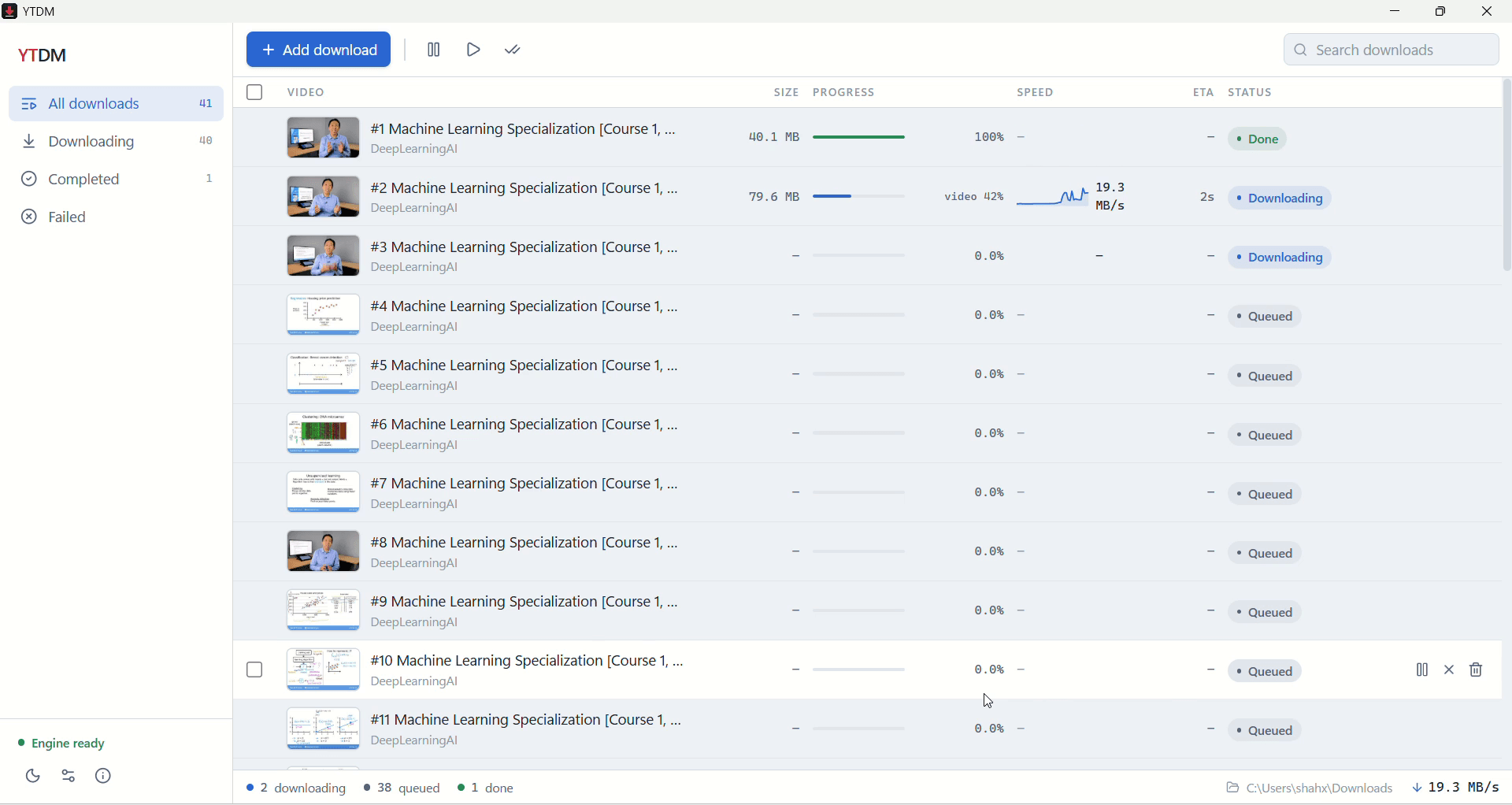
A 40-video playlist downloading on Windows — live speed graphs, ETA, and one-click pause per video.
Everything a download manager should do
Download queue
Queue dozens of videos with pause, resume, retry, and automatic crash recovery — interrupted downloads pick up where they left off.
Full playlists
Paste a playlist link, tick the videos you want, and they download into their own folder — no clutter.
Quality presets
Best MP4 for compatibility, best-available quality, 1080p, 720p, or audio-only M4A/MP3.
Subtitles included
Saves .srt subtitle files next to each video, fetched carefully so large batches don’t trip rate limits.
Live progress
Per-download speed graphs, ETA, and phase indicators (video, audio, processing) — a proper download manager, not a spinner.
Clipboard watcher
Copy a YouTube link anywhere and YTDM offers to download it. One keystroke from link to queue.
Speed control
A global bandwidth cap shared across downloads keeps YTDM from eating your connection.
Self-updating engine
The download engine (yt-dlp) updates itself independently of the app, so YTDM keeps working when YouTube changes things.
Download & install
All builds are produced automatically from the public source by GitHub Actions.
Windows 10 / 11
- Download the installer (.exe) and run it.
- If SmartScreen appears ("Windows protected your PC"), click More info → Run anyway. This is normal for new unsigned open-source apps — see the FAQ below.
- On first launch YTDM sets up its download engine (~60 MB, one time), then you're ready: paste a link, pick a quality, download.
Updates install themselves. Upgrading over an existing install keeps your queue and settings. Uninstall anytime from Apps & Features.
macOS isn't supported yet — if you want it, open an issue so I can gauge demand. A winget package for Windows is under review.
Questions people ask
Windows says "Windows protected your PC" — is this safe?+
Yes. New open-source apps without a paid signing certificate trigger SmartScreen until they build reputation. Click "More info", then "Run anyway". The full source code is public on GitHub if you want to audit or build it yourself.
Is YTDM really free?+
Completely. MIT-licensed, open source, no ads, no accounts, no telemetry. It talks only to YouTube (for your downloads) and GitHub (for updates).
Why does the first launch download extra components?+
YTDM fetches its open-source engine (yt-dlp, FFmpeg, Deno) on first run (~60 MB) instead of bundling it. That keeps the installer lean and lets the engine update itself the moment YouTube changes something — no waiting for a new app release.
Where do my downloads go?+
Your Downloads folder by default; playlists get their own subfolder. You can change the location in Settings.
Does it update itself?+
On Windows and with the Linux AppImage, yes — the app checks GitHub Releases, downloads updates in the background, and applies them on restart. The rpm/deb installs update through your package manager.
Is downloading from YouTube allowed?+
Downloading may violate YouTube’s Terms of Service. Use YTDM only for your own content, Creative Commons material, or content you otherwise have the right to save. You are responsible for how you use it.
YTDM stands on excellent open source: yt-dlp, FFmpeg, Deno and Electron.
Download YTDMFree · Open source · No ads · No telemetry